# Proxychains
proxychains - a tool that forces any TCP connection made by any given application to follow through proxy like TOR or any other SOCKS4, SOCKS5 or HTTP(S) proxy. Supported auth-types: "user/pass" for SOCKS4/5, "basic" for HTTP.
# Install proxychains Using apt-get
Update apt database with `apt-get` using the following command (if needed).
```
sudo apt-get update
```
After update, or, if you already have it, install it:
```
sudo apt-get -y install proxychains
```
# Install proxychains Using apt
Update apt database with `apt` using the following command.
```
sudo apt update
```
After update, or, if you already have it, install it:
```
sudo apt -y install proxychains
```
# Uninstall proxychains on Ubuntu
How To Uninstall proxychains on Ubuntu
```bash
sudo apt-get remove proxychains
```
or
Uninstall proxychains And Its Dependencie
```bash
sudo apt-get -y autoremove proxychains
```
or
Remove proxychains Configurations and Data
```bash
sudo apt-get -y purge proxychains
```
or
Remove proxychains configuration, data, and all of its dependencies
```bash
sudo apt-get -y autoremove --purge proxychains
```
# Configure Proxychains
Your going to need the Tor service for this. Do you have it? lets check
```bash
service tor status
```
If you do have it, skip this and go to the next part. If not, installing. Do this
```bash
sudo apt-get install tor
```
Here is where your configuration file is hiding. Edit it with whatever you use to edit stuff with.
```bash
vim /etc/proxychains.conf
```
Once your in, do this
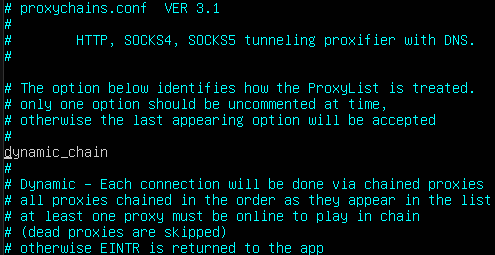
1. Remove "dynamic\_chain" from comment
[](https://wiki.danicus.net/uploads/images/gallery/2023-06/8h9bz0IqlThlBZTm-image.png)
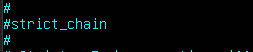
2. comment out 'strict\_chain" and Random chain
[](https://wiki.danicus.net/uploads/images/gallery/2023-06/DBJDMCgc8rK4RKSw-image.png)
3. Comment out 'proxy\_dns'
[](https://wiki.danicus.net/uploads/images/gallery/2023-06/GyKNoiixbD4S3HG7-image.png)
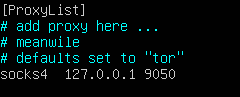
4. Last like in "ProxyList" type in 'socks5 127.0.0.1 9050' in last line of proxy list
[](https://wiki.danicus.net/uploads/images/gallery/2023-06/AHDkNqDDWAwlwICF-image.png)
# List of free proxies | IP addresses
Proxy list
137.184.110.255:8080 - USA
162.212.155.5:8080 - USA
170.64.136.32:8080 - Germiny
159.223.105.217:8080 - USA
[https://spys.one/en/https-ssl-proxy/](https://spys.one/en/https-ssl-proxy/ "Spy-one proxies")