Proxychains
proxychains - a tool that forces any TCP connection made by any given application to follow through proxy like TOR or any other SOCKS4, SOCKS5 or HTTP(S) proxy. Supported auth-types: "user/pass" for SOCKS4/5, "basic" for HTTP.
- Install proxychains Using apt-get
- Install proxychains Using apt
- Uninstall proxychains on Ubuntu
- Configure Proxychains
- List of free proxies | IP addresses
Install proxychains Using apt-get
Update apt database with apt-get using the following command (if needed).
sudo apt-get updateAfter update, or, if you already have it, install it:
sudo apt-get -y install proxychains
Install proxychains Using apt
Update apt database with apt using the following command.
sudo apt updateAfter update, or, if you already have it, install it:
sudo apt -y install proxychainsUninstall proxychains on Ubuntu
How To Uninstall proxychains on Ubuntu
sudo apt-get remove proxychainsor
sudo apt-get -y autoremove proxychainsor
sudo apt-get -y purge proxychainsor
Remove proxychains configuration, data, and all of its dependencies
sudo apt-get -y autoremove --purge proxychainsConfigure Proxychains
Your going to need the Tor service for this. Do you have it? lets check
service tor status If you do have it, skip this and go to the next part. If not, installing. Do this
sudo apt-get install tor
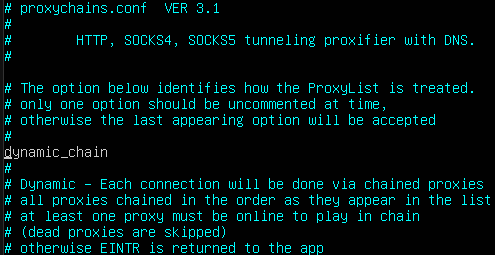
Here is where your configuration file is hiding. Edit it with whatever you use to edit stuff with.
vim /etc/proxychains.confOnce your in, do this
- Remove "dynamic_chain" from comment

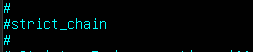
- comment out 'strict_chain" and Random chain

- Comment out 'proxy_dns'

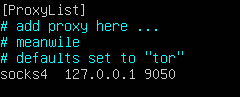
- Last like in "ProxyList" type in 'socks5 127.0.0.1 9050' in last line of proxy list


List of free proxies | IP addresses
Proxy list
137.184.110.255:8080 - USA
162.212.155.5:8080 - USA
170.64.136.32:8080 - Germiny
159.223.105.217:8080 - USA