# Hubl - Hubspot HTML/HUBL
The Hubl is the language used to create HTML pages within Hubspot.
# DND {% dnd %}
Refer to: [https://developers.hubspot.com/docs/cms/hubl/tags/dnd-areas](https://developers.hubspot.com/docs/cms/hubl/tags/dnd-areas)
---
-{% dnd\_area %} tag supplies the default content for the drag and drop area.
```
{% dnd_area "unique_name", class="main" %}
{% end_dnd_area %}
```
`dnd_area` tags can also contain the following tags:
- dnd\_section
- dnd\_column
- dnd\_module
- dnd\_row
---
-{% dnd\_section %} is a top-level row, and must be nested within a {% dnd\_area %}
```bash
{% dnd_area %}
{% dnd_section %}
{% end_dnd_section %}
{% end_dnd_area %}
```
`dnd_section` tags can also contain the following tags:
- dnd\_column
- dnd\_module
---
\- {% dnd\_column %} is a vertical structural building block that occupies one or more layout columns defined by its parent row. It must be nested within a {% dnd\_area %} tag
```bash
{% dnd_area %}
{% dnd_column %}
{% end_dnd_column %}
{% end_dnd_area %}
```
dnd\_column Can also contain dnd\_row.
---
\- {% dnd\_row %} is a horizontal structural building block that creates a nested 12-column layout grid in which columns and modules can be placed.
Must be nested within a {% dnd\_area %}
```bash
{% dnd_area %}
{% dnd_row %}
{% end_dnd_row %}
{% end_dnd_area %}
```
dnd\_row can also contain the following tags:
- dnd\_column
- dnd\_module
---
- {% dnd\_module %} is a module wrapped within a div where layout, styles and content can be added.
Must be nested within a {% dnd\_area %} tag.
```
{% dnd_area %}
{% dnd_module
path="@hubspot/rich_text",
offset=0,
width=8,
%}
{% module_attribute "html" %}
Hello, world!
{% end_module_attribute %}
{% end_dnd_module %}
{% end_dnd_area %}
```
# Modules {% module %}
Refer to: [https://developers.hubspot.com/docs/cms/building-blocks/modules/using-modules-in-templates](https://developers.hubspot.com/docs/cms/building-blocks/modules/using-modules-in-templates)
You must first create a module before you can use this tag. Then, you can use this to reference a module and use it in a template.
This will be our custom module.
[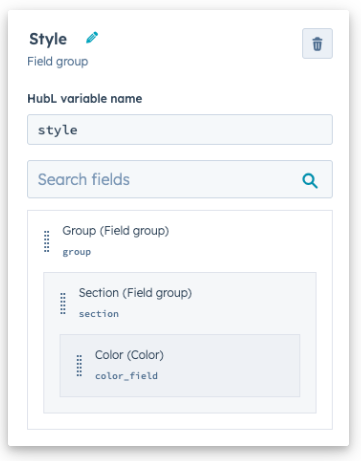](https://wiki.danicus.net/uploads/images/gallery/2023-10/JjhBFMMvDxveqwef-image.png)
---
Module tag / Module name / Module Path / Parameters /
- Module name = gives the module a unique identity in the context of the template.
- Path = always start with `@hubspot/` followed by the type of module (unless its custom).
- Parameters = are comma-separated, key-value pairs
- Requires double or single quotes
- Boolean - no quotes needed for `True` or `False` values.
```
{% module "unique_module_name" path="@hubspot/module_type" %}
```
Examples:
```
{# Basic syntax #}
{% module "unique_module_name" path="@hubspot/module_type",
parameterString='String parameter value',
parameterBoolean=True
%}
{# Sample of a default HubSpot text module #}
{% module "job_title" path="@hubspot/text",
label="Job Title",
value="Chief Morale Officer"
%}
{# Sample of a custom module #}
{% module "faqs" path="/myWebsite/modules/faq_module",
label="Custom FAQ Module"
faq_group_title="Commonly Asked Questions"
%}
```
---
#### Setting default values for style fields
```
{% dnd_module
path="./path/to/module",
styles={
"background_color":{
"color":"#123",
"opacity":50
}
}
%}
```
# .css auto adjust columns @media
This is tagged at the "class" in the HTML.
If you are using this for a Hubl module, include a class area for that module. Most likely you will put it at the beginning or first <div> for that module.
```html
```
In the .css you will include the following:
```css
.row {
display: grid !important;
grid-template-columns: repeat(4, 1fr) !important;
}
@media(max-width: 992px){
.row {
grid-template-columns: repeat(3, 1fr) !important;
}
}
@media(max-width: 600px){
.row {
grid-template-columns: repeat(2, 1fr) !important;
}
}
@media(max-width: 480px){
.row {
grid-template-columns: 1fr;
}
}
```
`repeat(4, 1fr)` You can adjust this to as many columns as needed repeat(3, 1fr) or, repeat(4, 1fr) or whatever.